How Does a Power Supply Work?
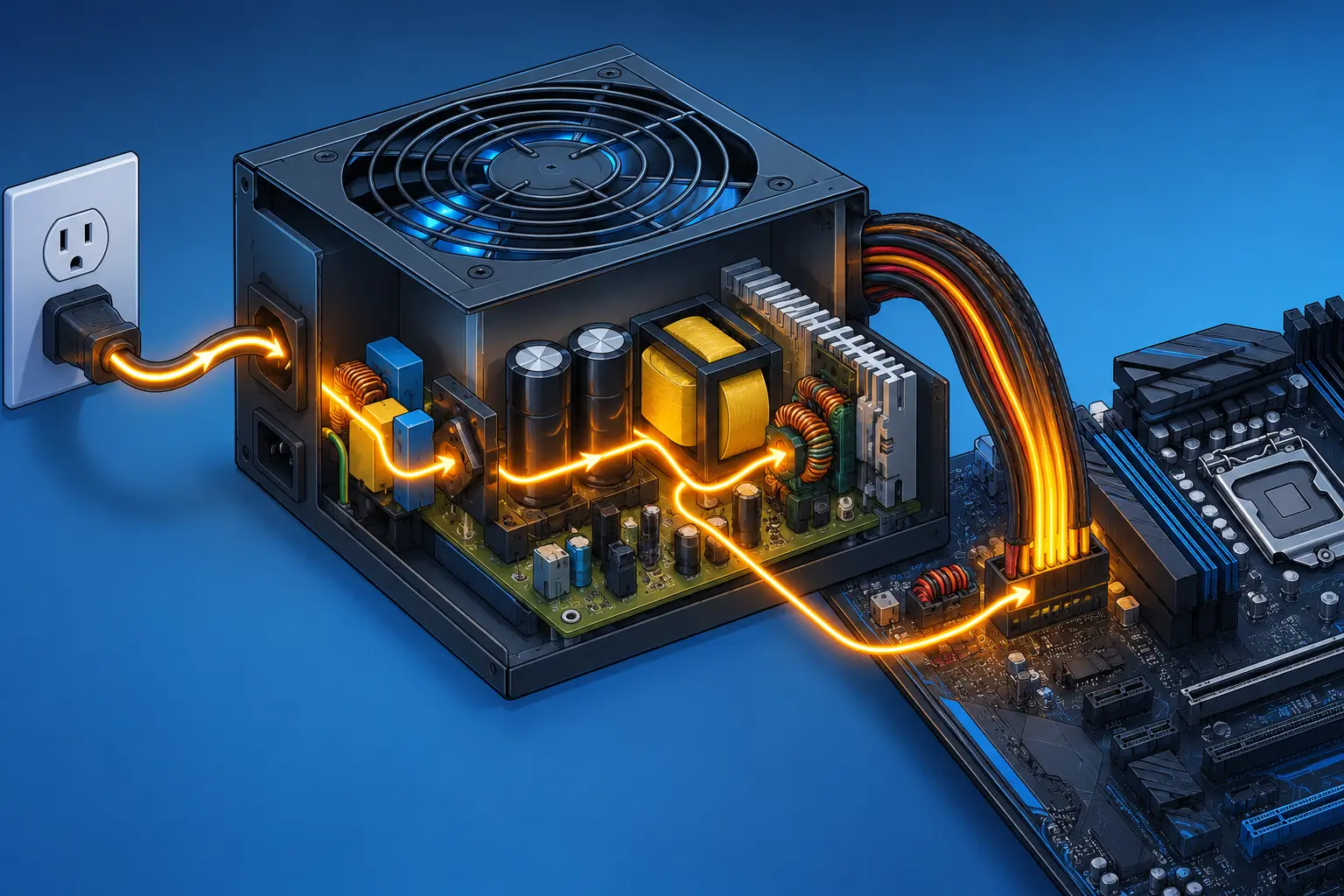
How does a power supply work? At the simplest level, it takes the messy, high-voltage AC power coming out of your wall and turns it into the small, steady, low-voltage DC power your electronics actually use. That's the entire job. A power supply doesn't generate power and doesn't do anything mystical — it converts and tames power that already exists.
This piece covers the general principle behind every power supply, from the brick charging your laptop to the industrial unit running a factory line, but it leans on one specific, familiar example throughout: the power supply unit (PSU) sitting inside a desktop computer. If you've ever opened a PC case and wondered why there's a whole metal box dedicated just to "power," rather than a simple wire, this is why.
What a Power Supply Actually Does
Start with the basic job before worrying about how it's done. A power supply takes power in one form and delivers it in a different, usable form — usually converting alternating current (AC) to direct current (DC), and usually stepping a high voltage down to several much lower ones.
That applies whether you're talking about the small brick that charges your phone, the laptop charger you carry around, or the PSU inside a desktop tower. All of them are doing the same essential job: taking the power available at the source and reshaping it into something the device on the other end can safely and reliably use. A phone charger just does it at a smaller scale, with fewer outputs, than a computer PSU.
Worth getting straight early: a power supply can't create energy out of nothing. Every watt it delivers came from the wall. What it's actually doing is conversion and regulation — changing the form power takes, and keeping it steady once it's in that form.
Why Your Computer Can't Just Plug Into AC Directly
Here's the actual problem a power supply exists to solve, and it's one most people have never had explained to them.
The electricity in your walls is alternating current, or AC — the direction of current flow switches back and forth, 60 times per second in the US. That's not a design flaw; it's the reason AC won the early "war of currents" over DC. AC voltage is easy to step up and down with a transformer, which makes it efficient to send over long power lines with minimal loss, and that's why the grid delivering power to your house runs on AC.
Computer chips, transistors, and just about every piece of modern electronics, though, need direct current, or DC — a steady, one-directional flow at a specific, unchanging voltage. A CPU doesn't care how efficiently power traveled to get to your house. It needs a rock-steady 12 volts or 5 volts or 3.3 volts, not a wave that's constantly reversing direction and swinging in magnitude.
So somewhere between the wall and the chip, that conversion has to happen. That's the entire reason a power supply exists as a distinct component rather than just being a wire.
How a Power Supply Converts AC to DC, Step by Step
This is the actual mechanism, and it happens in four stages. Every power supply — a wall wart or a full-size computer PSU — does some version of this.
Transformer. The transformer is usually the first thing the incoming AC hits. Its job is to step the wall voltage (120V in the US) down to a lower, more manageable AC voltage. Transformers work by using two coils of wire and a shared magnetic field, with no direct electrical connection between input and output — which also happens to provide electrical isolation, protecting the rest of the circuit (and you) from the full force of the mains voltage.
Rectification. Once the voltage is lower, it still alternates direction, and DC-hungry components can't use that. A rectifier — usually a set of four diodes arranged as a bridge — solves this by only letting current flow in one direction. The result is DC, but not smooth DC. It's a series of pulses, all in the same direction, but still rising and falling to zero over and over. Picture it as AC that's been folded in half rather than flattened out.
Filtering and smoothing. Those pulses aren't stable enough to run sensitive electronics. This is where capacitors come in. A capacitor stores charge and releases it to fill in the gaps between pulses, the same way a small water tank evens out a pulsing flow into something closer to a steady stream. The output afterward is much closer to true, flat DC — not perfect, but close.
Voltage regulation. Even after smoothing, there's still some ripple and drift left over, and different components need precise voltages to work correctly. A voltage regulator — a dedicated circuit, sometimes a whole feedback loop — locks the output to a fixed level regardless of small fluctuations in the input or the load on the output. This is the stage that turns "roughly DC" into "exactly the voltage this component was designed for."
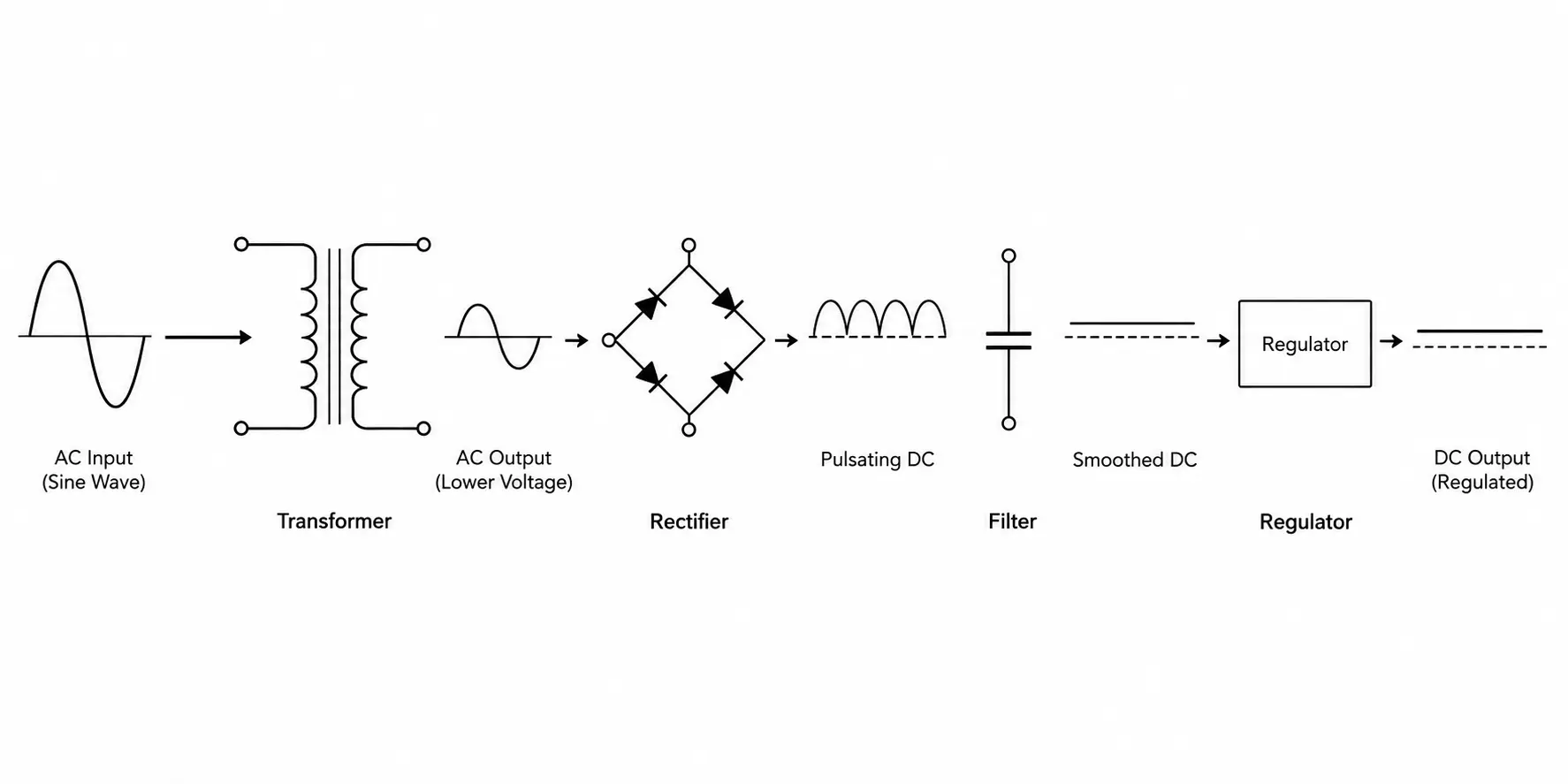
By the end of these four stages, you've gone from chaotic, alternating, high-voltage power from the wall to steady, precise, low-voltage DC that a chip can actually run on.
Linear vs. Switching Power Supplies
Not every power supply does the regulation step the same way, and this is where the terms "linear" and "switching" (or "switched-mode") come from.
A linear power supply regulates voltage by essentially burning off the excess as heat — the regulator sits in the circuit like a variable resistor, dropping whatever voltage isn't needed and dissipating it as waste heat. It's a simple, reliable approach that tends to produce very clean, quiet output with minimal electrical noise. The tradeoff is efficiency: burning off excess voltage as heat wastes energy and requires bulkier transformers and heatsinks to manage that heat.
A switching power supply takes a different approach. Instead of continuously burning off excess power, it regulates voltage by rapidly switching the current on and off — often tens of thousands to millions of times per second — and adjusting the timing of those switches to control the average output. That lets it use much smaller, lighter transformers and waste far less energy as heat, which is why switching supplies are so much more compact and efficient than linear ones of equivalent output.
Virtually every computer PSU built today is a switching power supply. Linear supplies haven't disappeared — they still show up where minimizing electrical noise matters more than efficiency or size, like some audio equipment or sensitive medical instrumentation — but for anything that needs to deliver hundreds of watts inside a compact metal case without turning into a space heater, switching is the only practical choice.
Inside a Computer Power Supply: Rails and Connectors
Now take everything above and put it inside an actual PC. This is where the abstract process becomes the literal box you'd see if you opened your case.
A computer PSU doesn't just output one DC voltage — it delivers several, called rails, because different components need different voltages:
Rail | Typical voltage | What draws from it |
|---|---|---|
+12V | 12 volts | CPU, GPU — the components that need the most power |
+5V | 5 volts | Some drive electronics, USB (legacy use), motherboard logic |
+3.3V | 3.3 volts | Motherboard chipset and other low-power logic |
In modern systems, the 12V rail carries the overwhelming majority of the load, because that's what feeds the two power-hungry components — the CPU and especially the GPU — that account for most of a gaming or workstation PC's power draw.
Getting those rails from the PSU to the rest of the system is a job for specific connectors, each built for a purpose:
The 24-pin ATX connector feeds the motherboard itself.
The EPS connector (4-pin or 8-pin) delivers dedicated power straight to the CPU.
PCIe power connectors (6-pin, 8-pin, or the newer 12VHPWR/12V-2x6) feed the graphics card.
SATA power connectors feed drives.
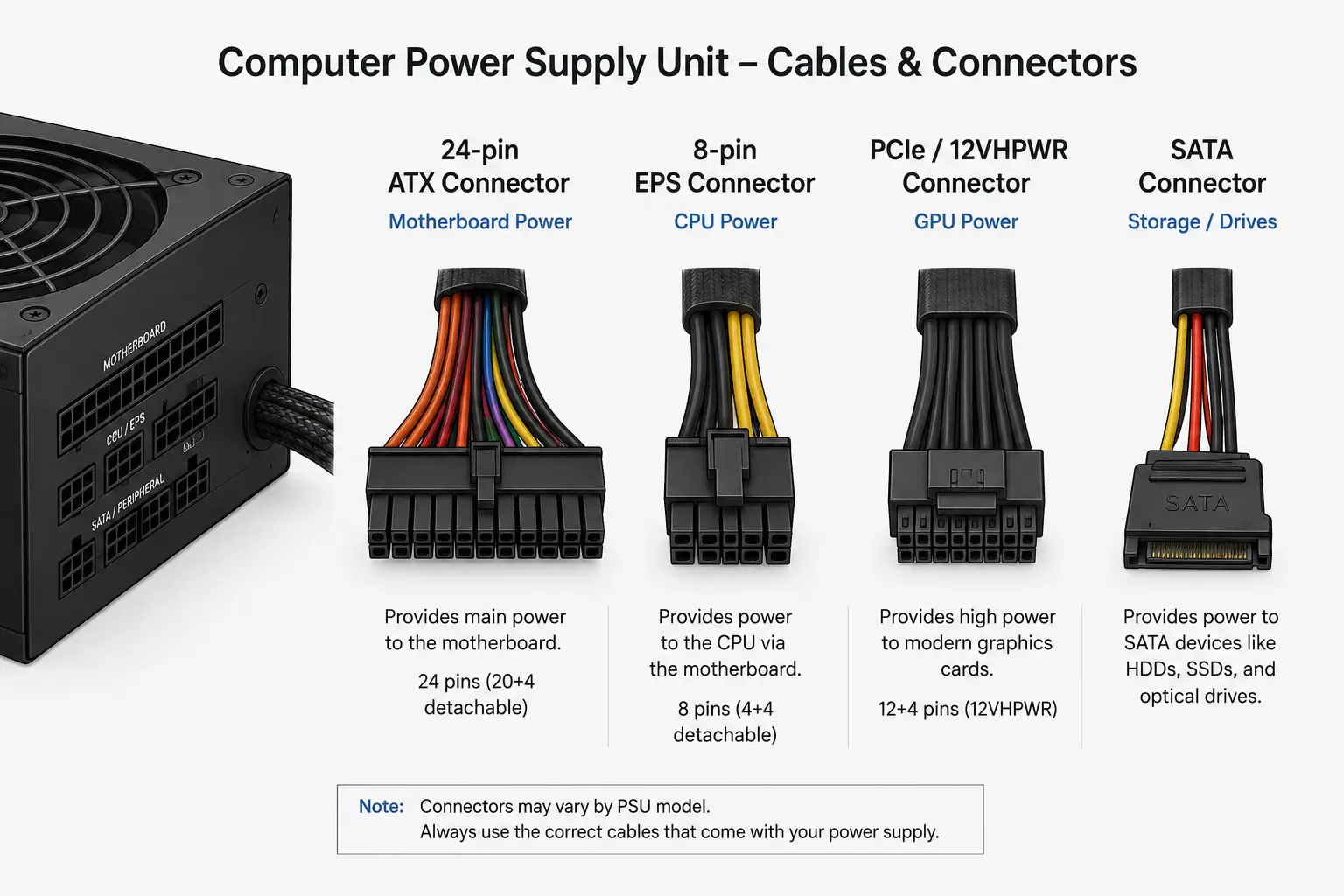
That last one — the GPU connector — has changed recently, and it's a direct consequence of everything covered above. High-end graphics cards started drawing more power than older 6-pin and 8-pin PCIe connectors were rated to deliver safely, so a new, denser 12VHPWR connector, revised to 12V-2x6, was introduced to carry more current through a smaller physical connector. It's the same story as the rest of this piece: components need a specific, reliable amount of power, and the hardware delivering it has to keep evolving to match.
Why Power Supplies Aren't 100% Efficient
Go back to the four conversion stages for a second. Every one of them loses a little energy along the way — the transformer, the rectifier diodes, the regulation circuitry. None of that is a defect; it's just physics. Converting power from one form to another is never perfectly lossless, and the lost energy shows up as heat, which is the actual reason a PSU needs a fan.
This is what an 80 PLUS rating is actually measuring: the percentage of the power a PSU pulls from the wall that makes it out as usable DC output, at specified load levels, rather than being lost as heat. The tiers set a rising bar. Standard requires 80% efficiency at 20%, 50%, and 100% load; Bronze, Silver, and Gold each push that higher; Platinum and Titanium sit at the top, with Titanium requiring roughly 90-94% efficiency depending on load. A PSU with a higher rating wastes less power as heat at a given load — in practice, that means lower electricity costs, less heat for your case fans to deal with, and often quieter operation since there's less heat to remove.
Efficiency isn't the only thing that determines whether a PSU is good — build quality, protection circuitry, and reliable components matter plenty too — but it's a direct, measurable consequence of how well-designed those AC-to-DC conversion stages actually are.
Built-In Protection Features — and a Safety Note
A quality power supply does more than convert power; it also watches for conditions that could damage the components downstream. Most modern PSUs include:
Overvoltage protection, which shuts the unit down if output voltage climbs above a safe threshold
Overcurrent protection, which cuts power if a component or short circuit is trying to draw more current than is safe
Short-circuit protection, which specifically detects a direct short and shuts down before it can cause damage
These exist because a malfunction inside the PSU or downstream could otherwise send damaging voltage or current straight into your CPU, GPU, or drives.
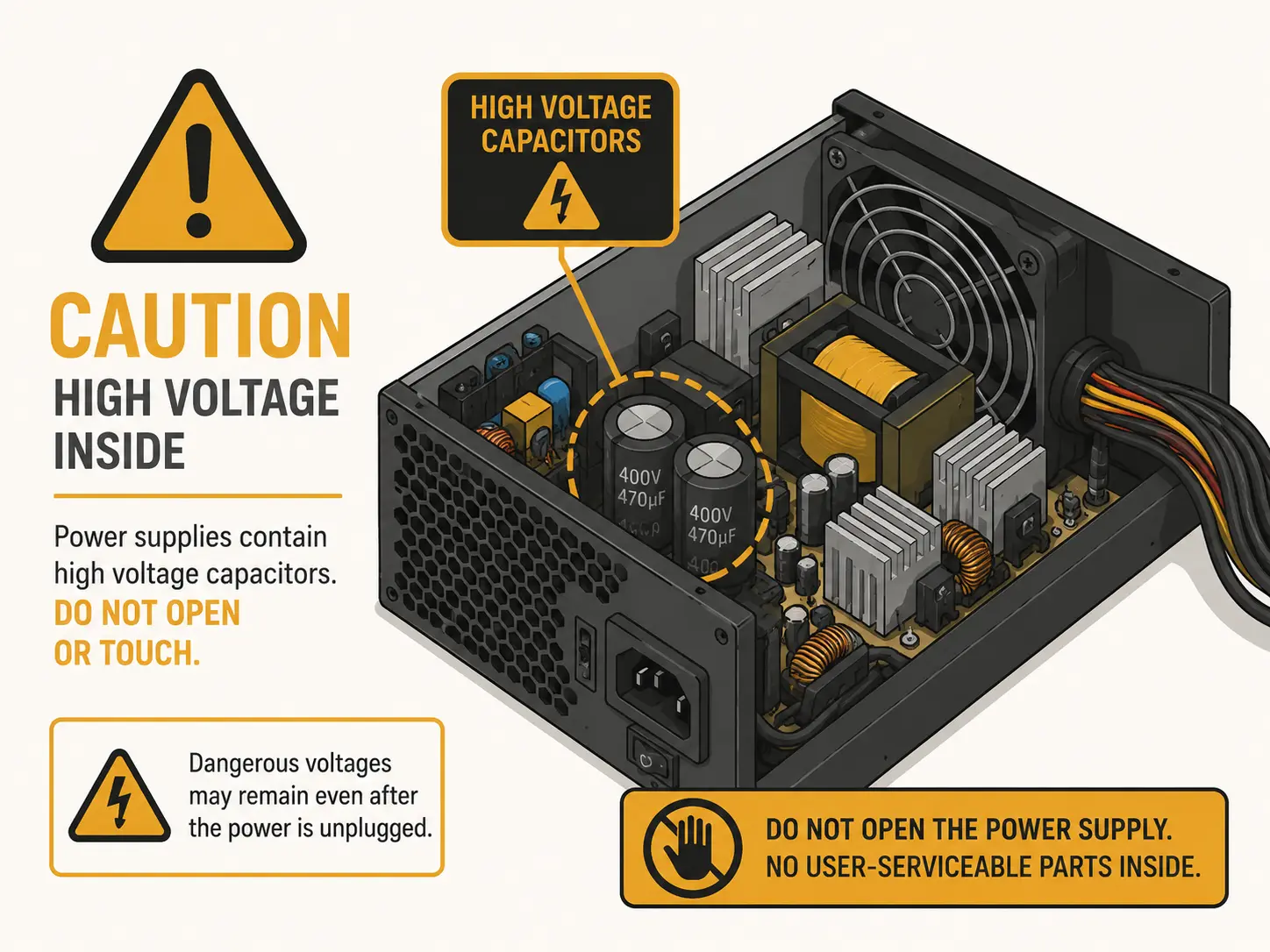
Here's the part that doesn't get said enough: the capacitors inside a power supply can hold a stored electrical charge even after it's been unplugged. That's the whole point of a capacitor — it stores charge — and depending on the design, that charge can persist for a meaningful amount of time after power is disconnected. Replacing a fan or a cable outside the unit is fine. Opening the metal casing of a PSU and poking around inside it isn't a casual weekend project the way most other PC upgrades are, and it's not something to do without knowing exactly what you're doing.
Signs Your Power Supply Is Failing or Undersized
Understanding how a PSU works also means you can recognize when something's going wrong with it. A few real-world symptoms worth knowing:
Random reboots or shutdowns, especially under load — if your system dies the moment you start a demanding game or render job, the PSU may not be delivering enough stable power for that spike in draw.
The system won't POST at all — a completely dead or badly failing PSU can leave a system showing no signs of life.
Coil whine — a high-pitched noise, often more noticeable under heavy GPU load, coming from the PSU's internal coils. Usually harmless, but can indicate a lower-quality unit.
A burning smell — take this seriously and stop using the unit; it usually means a component has failed and overheated.
Crashes that started only after installing a more power-hungry component, like a new graphics card — the classic sign that a PSU that used to be adequate is now undersized for the system's real power draw.
None of this is a full diagnostic guide — plenty of other hardware issues produce similar symptoms — but if a system was stable and only started acting up after a power-hungry upgrade, or destabilizes specifically under heavy load, the PSU is a reasonable first place to look.
The Short Version
A power supply doesn't make power — it reshapes it. Wall AC gets stepped down by a transformer, rectified into pulsing DC, smoothed by capacitors, and locked to a precise voltage by a regulator. Inside a computer, that regulated power splits across a few different voltage rails and routes through specific connectors to the parts that need it: the CPU, the GPU, the drives, everything else. The conversion is never perfectly efficient, which is why PSUs generate heat and carry efficiency ratings. And it's not entirely risk-free to tinker with, which is why the inside of the case is worth respecting rather than opening. Once you've seen the whole path from outlet to component, the box that used to be a mystery starts making a lot more sense.