The Best AI Video Ad Generators in 2026: An Honest Comparison for Small Businesses
Search "best AI video ad generators" and almost every result you'll click on is written by the tool it ranks number one. HeyGen's blog puts HeyGen first. AdCreate's guide puts AdCreate first. Mootion gives itself a 4.9-star rating it assigned to itself. That's not a conspiracy, it's just how content marketing works — but it also means a small business owner trying to figure out which tool fits their budget is stuck reading advertising dressed up as advice.
This guide has nothing to sell. It's built around what a real small business or solo marketer cares about: what a tool costs once you strip away the marketing page, which ad format fits your business, and whether AI-generated video is even allowed on the platforms you're advertising on. That last question, oddly, is one almost nobody covers.
How this comparison works — and who it's for
The tools below are grouped by realistic monthly budget, not "best overall" versus "best for enterprise," because that's the actual decision most small business owners are making. Each one is judged on three things: what it really costs to produce a usable, watermark-free video (not just the advertised starting price), how fast someone with zero video-editing background can get a postable ad out the door, and whether the output looks native enough for Meta, TikTok, or YouTube rather than reading as an obvious ad.
This is written for solo marketers and small business owners running their own campaigns on a budget somewhere between $0 and $200 a month. If you're a media buyer at an agency evaluating API access, bulk-generation workflows, or multilingual dubbing at scale, most of this won't be for you — those tools exist, but that's a different comparison.
UGC-style, spokesperson, or product ads: which type fits your business
Before you look at a single tool, it helps to know which category you actually need. AI video ad generators mostly fall into three shapes, and picking the wrong one wastes both your money and your first month of testing.
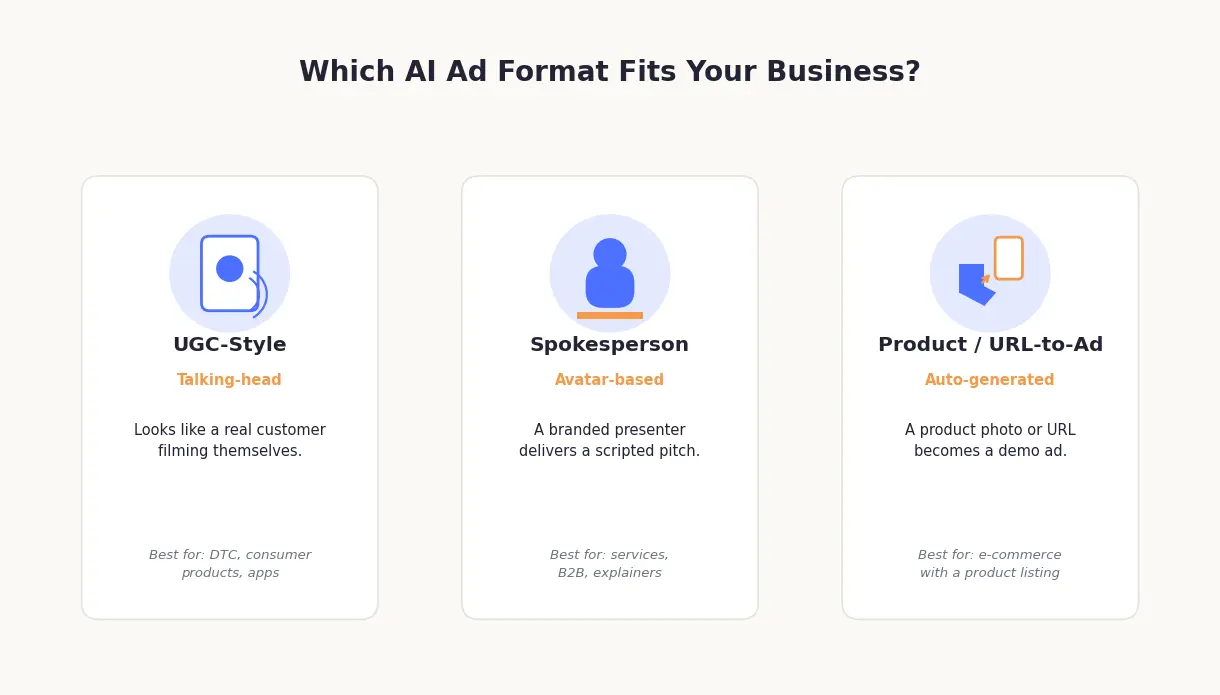
UGC-style, talking-head ads look like a real person — a customer, a creator, someone who isn't obviously a brand — filming themselves talking about a product. These perform well because they don't read as advertising at first glance. If you sell a consumer product, run a DTC brand, or have an app that benefits from a "here's what I found" framing, start here.
Spokesperson and avatar ads use a branded or virtual presenter delivering a scripted pitch, closer to a traditional commercial than a phone-camera video. These suit service businesses, B2B offers, or anything that needs a clear explanation rather than a testimonial vibe — a local law firm, a SaaS tool, a consulting practice.
Product and URL-to-ad tools take a product photo or a product page URL and turn it into a demo-style ad automatically, without needing you to write a script or film anything. If you sell a physical product with an existing listing — on Shopify, Amazon, or your own site — this is usually the fastest path to your first ad.
Plenty of tools do more than one of these reasonably well, so treat this as a starting point rather than a rigid box. But if you walk into a tool without knowing which shape you need, you'll end up testing the wrong format for weeks before realizing the ad style itself, not the execution, was the problem.
The best AI video ad generators by budget
Pricing across this category is inconsistent in a way that seems almost deliberate. Some vendors publish exact tiers; others hide pricing behind a signup form; a few don't mention cost anywhere on their comparison pages at all. Below is what's actually verifiable, organized by what you'd realistically spend per month — plus what's genuinely free versus what forces an upgrade the moment you try to remove a watermark or post more than a couple of videos.
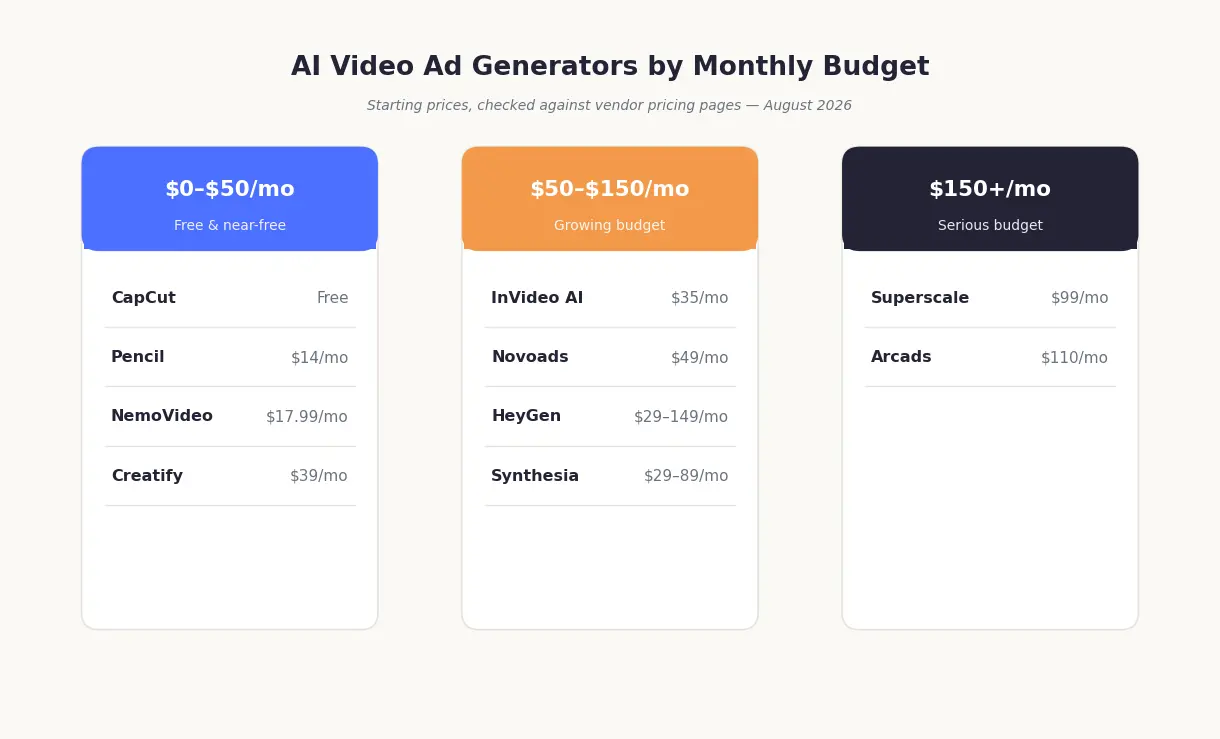
Free and near-free ($0–$50/month)
CapCut is free and probably already on your phone. It's not purpose-built for ads — it's a general video editor with AI features bolted on — but its Commerce Pro tools handle basic product-ad templates well enough for a first test. Reach for it if you just need something to cut and caption footage you already have. Pass if you need the AI to generate the footage itself; that's not really what CapCut does.
Creatify turns a product URL into a short ad automatically, which makes it one of the faster options for e-commerce sellers. The free tier gives you 10 credits a month (enough for a couple of watermarked video ads); the Starter plan removes the watermark and runs $39 a month for 100 credits. Good fit if you sell a physical product with an online listing. Skip it if your business is service-based — URL-to-ad tools need a product page to work from.
Pencil is built specifically for ad generation and starts at $14 a month (or $11 a month billed annually) for 50 generations, with a free trial that lets you build six ads before you pay anything. It's one of the cheaper purpose-built options on this list. Makes sense for someone who wants an ads-first tool without paying for features they won't use. Not for you if you need heavy customization — at this price, you're trading flexibility for speed.
NemoVideo markets itself directly at small businesses. Its free plan is real — 100 credits a month, though exports carry a watermark — and the cheapest watermark-free tier runs $17.99 a month at the time of writing (a promotional rate off a $24.99 list price, so confirm the current number before you commit). It's organized around budget tiers rather than feature tiers, which is closer to how most small business owners think about spend. Good fit if cost is your main constraint and you're comfortable with a smaller feature set. Skip it if you need a large tool library or advanced avatar customization.
A word on "free": every tool in this tier is free in the sense that you can generate something without a credit card. What's actually free to use — watermark-free, at a resolution good enough to run as a paid ad, with commercial usage rights included — is a much shorter list, and most of these tools make that upgrade point clear only after you've already invested time building your first ad. Read the fine print on usage rights specifically; a video you can't legally run as a paid ad isn't actually free.
Growing budget ($50–$150/month)
HeyGen is built around AI avatars and spokesperson-style video. The free tier gives you three watermarked one-minute videos a month; the Creator plan removes the watermark at $29 a month, and a Business plan at $149 a month (plus $20 per extra seat) adds team features. That Business tier is where a lot of small businesses land once they need more than a handful of videos a month, which puts HeyGen squarely in this budget bracket in practice. Good fit for service businesses that want a consistent, branded presenter across every ad. Skip it if you're chasing the "looks like a real customer" UGC style — avatars read as avatars, however polished.
Synthesia covers similar ground to HeyGen with a stronger lean toward corporate and training-style video. The free plan gets you about 10 minutes of video a month across 9 avatars; the Starter plan runs $29 a month billed monthly ($18 if you commit annually), and the popular Creator plan jumps to $89 a month. Worth a look if you already associate it with training content and want the same tool for ads. Skip it if ad-specific features — platform export presets, hook-testing workflows — matter more to you than general-purpose polish.
InVideo AI leans on templates and a text-to-video workflow. Its free tier is genuinely limited — a small weekly credit allowance that resets and doesn't roll over — and the first real paid tier, Plus, runs $35 a month for 10 credits, climbing to $60 for the Max plan and $120 for the Generative plan. Good fit if you want something closer to a flexible editor with AI assistance rather than a narrow ads-only tool. Skip it if you want a tool that does one thing — ads — extremely well rather than many things adequately, or if you're expecting the lower end of this tier's pricing.
Novoads is organized around what it calls a "format-fit" approach — matching ad shape to tool rather than ranking by price. A $1, three-day trial leads into a Starter plan at $49 a month (about 12 UGC videos), with Pro at $79 a month and Studio at $99 a month for more volume. Good fit for product-led UGC ads with multi-language support. Skip it if you only need occasional, low-volume output — the pricing model rewards regular use.
Serious budget ($150+/month)
Arcads focuses on realistic talking-head UGC content and has a reputation for strong output quality. Pricing runs $110 a month for the Starter plan (10 videos, working out to $11 a video) and $220 a month for Creator (20 videos, same per-video rate), with custom pricing above that. The real friction isn't hidden pricing so much as no free trial at all — you commit to a paid plan before generating a single video, which is unusual in this category and worth budgeting around. Good fit if output realism is your top priority and cost is secondary. Skip it if you want to test the output before paying anything.
Superscale sits at a similar price point — a Standard plan at $99 a month with full features included from day one, plus 300 free credits at signup and a five-day trial with 3,000 additional credits to test before committing. Good fit for a business already spending meaningfully on paid ads and treating video generation as part of that budget rather than a separate line item. Skip it if you're still testing whether AI video ads work for your business at all — start cheaper first.
At this budget tier, you're generally paying for volume, output realism, or both — not for capabilities that are fundamentally unavailable at lower tiers. If you're a small business just getting started, there's a reasonable argument for proving the format works at $50 or less before spending $150-plus a month on it.
Tool | Starting price | Free tier / watermark | Ad shape | Best for | One honest limitation |
|---|---|---|---|---|---|
CapCut | Free | Free; standard exports aren't watermarked | Editing/product | Editing footage you already have | Doesn't generate ad footage itself |
Creatify | $39/mo (Starter) | Free tier: 10 credits/mo, watermarked | Product / URL-to-ad | E-commerce with a product URL | Needs a product page to work from |
Pencil | $14/mo (Core), $11/mo billed annually | Free trial: 6 ads, no ongoing free tier | Product / UGC | Budget-conscious, ads-only need | Less customization than pricier tools |
NemoVideo | $17.99/mo (Starter, promo rate) | Free tier: 100 credits/mo, watermarked | Product / UGC | Lowest realistic entry cost | Smaller feature set and avatar library |
HeyGen | $29/mo (Creator); $149/mo (Business) | Free tier: 3 videos/mo, watermarked | Spokesperson/avatar | Service businesses wanting a consistent presenter | Avatars read as avatars, not real customers |
Synthesia | $29/mo (Starter, monthly billing) | Free plan: ~10 min/mo, 9 avatars | Spokesperson/avatar | Corporate-leaning brands | Fewer ad-specific export presets |
InVideo AI | $35/mo (Plus) | Free tier: small weekly allowance, may carry branding | Templates/general | Wanting one flexible tool, not just ads | Jack-of-all-trades, not ads-first |
Novoads | $49/mo (Starter) | $1, 3-day trial | Product/UGC | Multi-language product-led UGC | Pricing scales fast with volume |
Arcads | $110/mo (Starter, 10 videos) | No free trial | UGC/talking-head | Output realism above all | No way to test before paying |
Superscale | $99/mo (Standard) | 300 free credits + 5-day trial (3,000 credits) | Mixed | Businesses already spending on paid ads | Not a starting point for first-time testers |
Pricing checked directly against each vendor's official pricing page in August 2026 and changes often in this category — confirm current numbers before you commit, especially for tools running promotional rates.
Can you actually use AI-generated video in Facebook, TikTok, and YouTube ads?
Short answer: usually yes, but you'll often need to disclose it, and exactly how differs by platform. This is the question almost every "best AI video ad generator" list skips entirely, which is strange given that it's the difference between an ad that runs and one that gets pulled.
Meta's policy, updated as recently as June 2026, scales with how realistic your content is rather than applying one blanket rule. Ads with minor AI edits and no photorealistic people don't need a label at all. Ads with more significant AI editing but no photorealistic humans get a disclosure tucked behind the "About this ad" menu. Ads that include AI-generated photorealistic humans — which describes a lot of what avatar and UGC-style tools produce — get a visible "AI info" label right next to "Sponsored." Meta also runs automated detection on top of self-disclosure, so it's not purely an honor system.
TikTok requires a disclaimer for any ad that's "AI-generated, synthetic, or manipulated media," according to its own Ads Manager help documentation — this is a hard requirement, not a suggestion (TikTok separately suggests, but doesn't require, disclaimers for things like prescription drug ads). The disclaimer adds a clickable label to the ad explaining that it includes AI-generated content. If you're running a UGC-style or avatar-based ad on TikTok, plan to use this disclaimer.
YouTube's official policy on altered and synthetic content requires disclosure for material realistic enough to be mistaken for real footage — deepfakes, fabricated events, a real person appearing to say or do something they didn't. Two caveats worth knowing: minor edits like color grading or a beauty filter don't require disclosure, and Google's published guidance here is written for creator uploads rather than paid advertising, so if you're running AI-generated video through Google Ads specifically, it's worth double-checking Google Ads' own ad policies rather than assuming the creator-content rules map over exactly.
The practical stakes for a small business are almost always ad disapproval, a required edit, or a visible label — not anything more severe. This isn't a legal risk in the way it might sound. The useful practical tip: several of the tools above have started building compliant export and labeling options into their workflow, since getting flagged is bad for their business too. Check for that option before assuming you need to add disclosure manually, and because these policies have been changing quickly, check each platform's current rules directly before you launch a campaign rather than relying on any single summary — including this one.
AI video ads vs. hiring a UGC creator: what's actually cheaper and faster
A single 15–30 second UGC-style ad from a freelance creator typically runs $50 to $500 or more, with roughly $198 cited as a common benchmark for a single deliverable — and that's before usage rights, which can add another 30–50% if you want to run the video as a paid ad rather than just post it organically. It also takes anywhere from a few days to a couple of weeks once you account for briefing, filming, and revisions. An AI-generated equivalent from one of the tools above costs a few dollars to maybe $20 in credits or subscription cost per video, and can be produced — including a handful of variations to test — in under an hour.
That math makes AI look like the obvious choice, and for a lot of small businesses testing new messaging or new audiences, it is. But it's not the right call in every case. If your brand depends heavily on a specific founder's voice or a distinctive, hard-to-replicate personality, a real creator who understands that voice will usually outperform an AI tool trying to approximate it. The same goes for a genuinely complex physical product demo — assembly, texture, scale — where AI-generated footage still tends to look slightly off in ways a real camera doesn't. And for a niche, sophisticated audience that's already skeptical of ads, AI-generated content that reads as AI-generated can actively hurt you.
Where AI clearly wins is speed and volume of testing. If your goal is to find out which hook, angle, or offer converts before you commit real budget to it, generating ten cheap variants and letting the data decide beats commissioning ten expensive ones from a human creator. Most small businesses under roughly $150 a month in ad-tool spend are better served starting there and graduating to real creators once they know what's working.
How to pick the right tool in 5 minutes
Work through it in order. First, figure out your ad shape — UGC-style, spokesperson, or product/URL-to-ad — from the section above; this narrows the field more than anything else. Second, pick your budget tier honestly, including what it'll cost once you need watermark-free, commercial-use video, not just the advertised entry price. Third, if you're running Meta or TikTok ads specifically, check whether your shortlisted tool has built-in compliant labeling before you commit.
For a solo e-commerce seller with under $50 a month to spend, start with Creatify or NemoVideo and a product URL. For a local service business wanting a consistent presenter across ads, HeyGen's entry tier is the more straightforward starting point than Synthesia's more corporate-leaning tools. If output realism matters more than budget certainty, Arcads is worth the pricing friction — just go in expecting to pay before you see a free sample.